
Start from the market, not a list
Industry and NAICS, employee count, revenue range, geography, keywords, and technology signals.
Define a market by industry, size, and geography, narrow it to the businesses showing real activity, and export the result with the people who sign already attached.
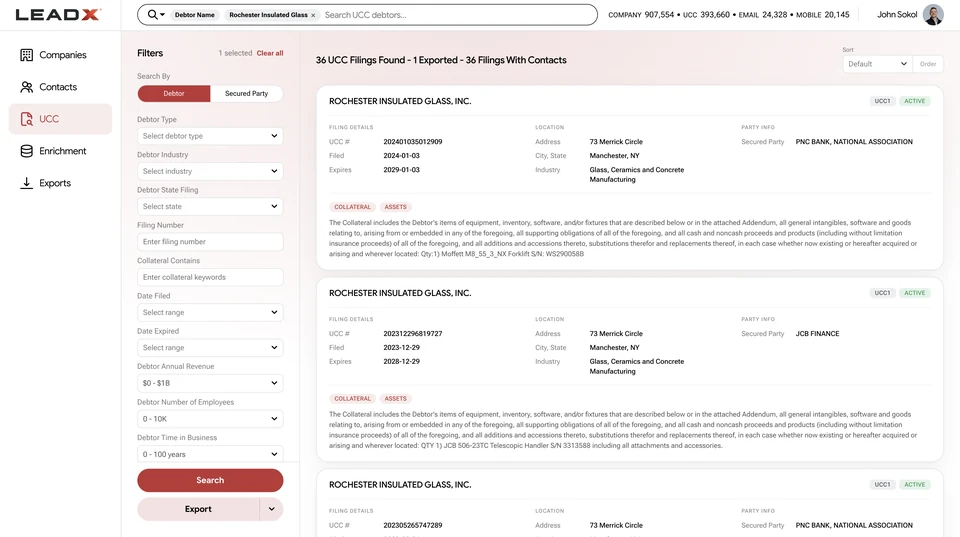
Firmographics tell you which businesses fit a profile. They do not tell you which ones are doing anything. LeadX layers public financing activity, equipment purchases, web presence, and reputation onto the company record, so a territory can be ordered by evidence instead of alphabetically — and exported with contacts rather than handed to a researcher. Learn how to build a target-account list and enrich a sales lead end to end. See how this works for B2B sales teams.
Industry and NAICS, employee count, revenue range, geography, keywords, and technology signals.
Recent UCC filings, equipment purchases, and reputation signals separate active accounts from dormant ones.
Owners, CFOs, and controllers with verified email and mobile arrive with the account.
Export to CSV, sync to CRM, or pull the same query through the API.
Order a patch by recent financing activity rather than company size alone.
Move into an adjacent industry or geography using the same qualification filters.
Trigger a list from filing activity in the last 30, 60, or 90 days.
Re-run a saved definition to catch businesses that became qualified since last quarter.
Start with firmographics that define your market — industry or NAICS, employee count, revenue range, and geography. Narrow with signals that indicate activity, such as recent UCC filings or equipment purchases. Then add contacts by title and seniority and export. See company data.
Targeting is fit: the business matches your profile. Qualification is evidence: the business has actually done the thing that makes it a buyer. A filing showing equipment financed last quarter is evidence. An industry code is not.
Yes. Contacts are attached to the company record, so an export carries verified business email, direct phone, and mobile numbers alongside the account rather than requiring a separate enrichment pass. See contact data.
Yes. Exclusion filters remove named accounts and specific field values before export, so a list arrives net of current customers and prior outreach.
That depends on the signal you are using. Firmographics move slowly; filing activity does not. Teams working from financing signals typically re-run a saved definition monthly or quarterly to pick up businesses that became qualified in the interim.
Yes. The same search is available through the REST API and enterprise bulk delivery, which is how teams schedule list builds instead of running them by hand.